Inside SE Visible: What you see and where the data comes from

At some point in an AI visibility readout, someone opens ChatGPT on their phone and checks. If what they see doesn’t match your report, the number loses credibility, and so do you.
Most tools hand you a visibility score. Fewer explain how it was produced. This article walks you through what’s inside SE Visible by SE Ranking, then opens up how the data behind each view is collected and scored.
What is SE Visible?
SE Visible by SE Ranking is an AI visibility platform that tracks how AI answers mention your brand and cite your website, and how that compares with the competitors named beside you. It covers five answer engines for now: ChatGPT, Gemini, AI Mode, AI Overviews, and Perplexity. And more are coming.
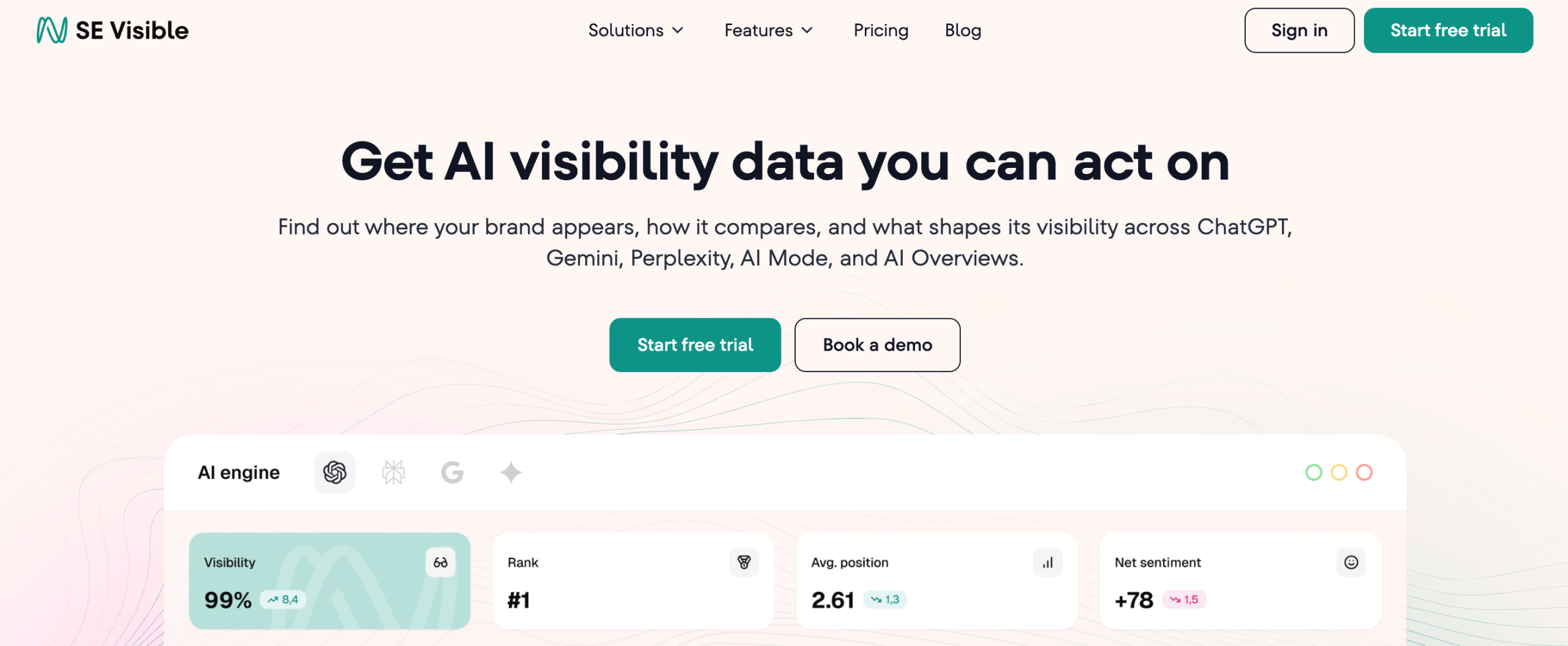
For each prompt you track, it records whether your brand appears and where it sits in the answer. It also reads the tone of each mention and logs which sources the engine cited and which competitors AI mentions.
SE Visible didn’t appear overnight to ride the interest in LLMs. It comes from the SE Ranking team that has tracked how search works for years and has watched it change more than once. That experience brings a data foundation and a habit of treating visibility as a long-term discipline. It also brings a clear sense that a product which stops evolving falls behind quickly when search itself keeps moving.
The two also work well together. SE Visible shows where you stand in AI answers, and SE Ranking covers the SEO side, including rank tracking, keyword research, competitor analysis, backlink checking, and technical audits, so you get a fuller picture of your brand performance across traditional search and LLMs.
And if you add Planable, a sister product, to the suite, you get social media management and analytics covered. This way, you work with different surfaces LLMs pull from.
What’s inside SE Visible?
SE Visible splits its data across four working views:
- Dashboard
- Prompts
- Competitors
- Sources
Each one answers a different question about your AI visibility.
Dashboard: where you stand right now
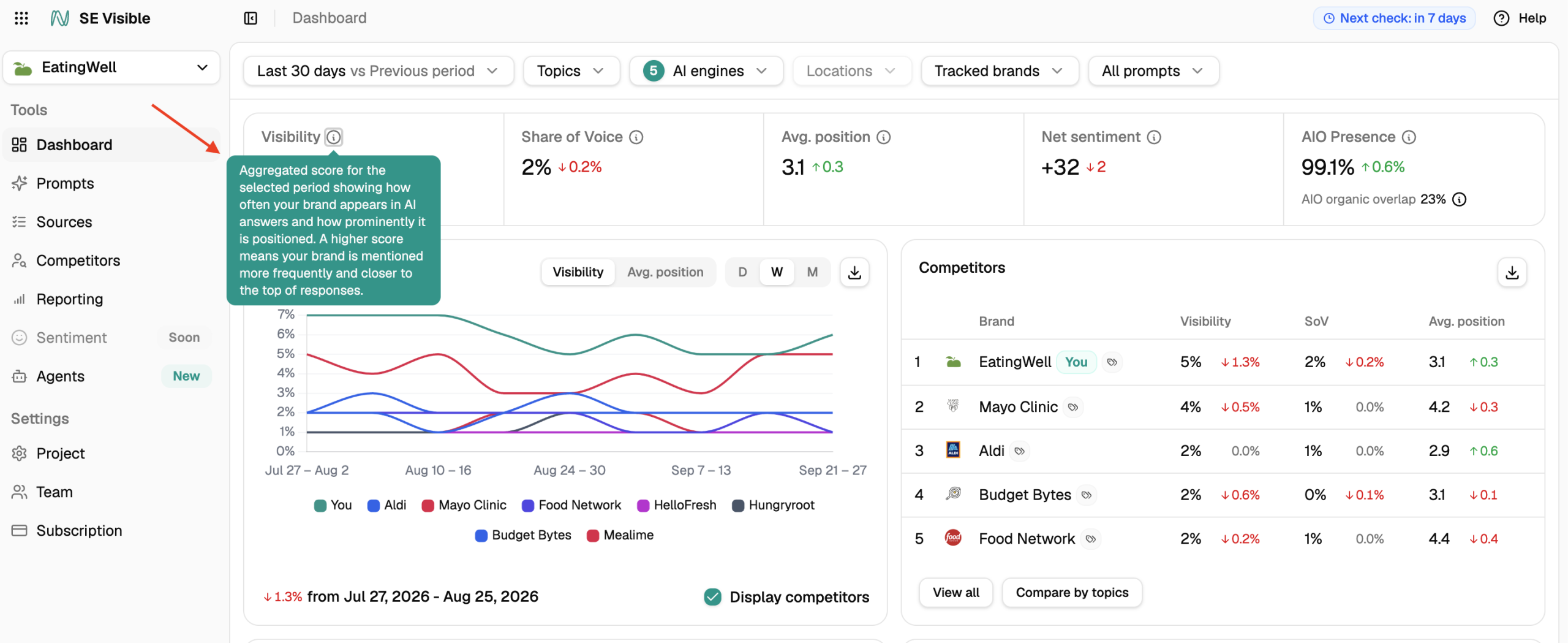
The AI brand visibility dashboard is the summary view of a project, and it’s the screen most agencies show clients.
It’s built around four headline metrics:
- Visibility: how often AI answers mention your brand, weighted by where the mention appears in the answer.
- Share of voice: your share of mentions compared with the competitors you track.
- Average position: where your brand usually appears in the answers that mention it.
- Net sentiment: the share of positive mentions minus the share of negative ones, on a scale from -100 to +100.
When Google AI Overview is among the selected engines, two more metrics appear on the dashboard:
- AIO Presence shows the percentage of your tracked prompts that triggered an AI Overview.
- AIO organic overlap counts how many links from Google’s organic top 20 for a query also appear inside that query’s AI Overview.
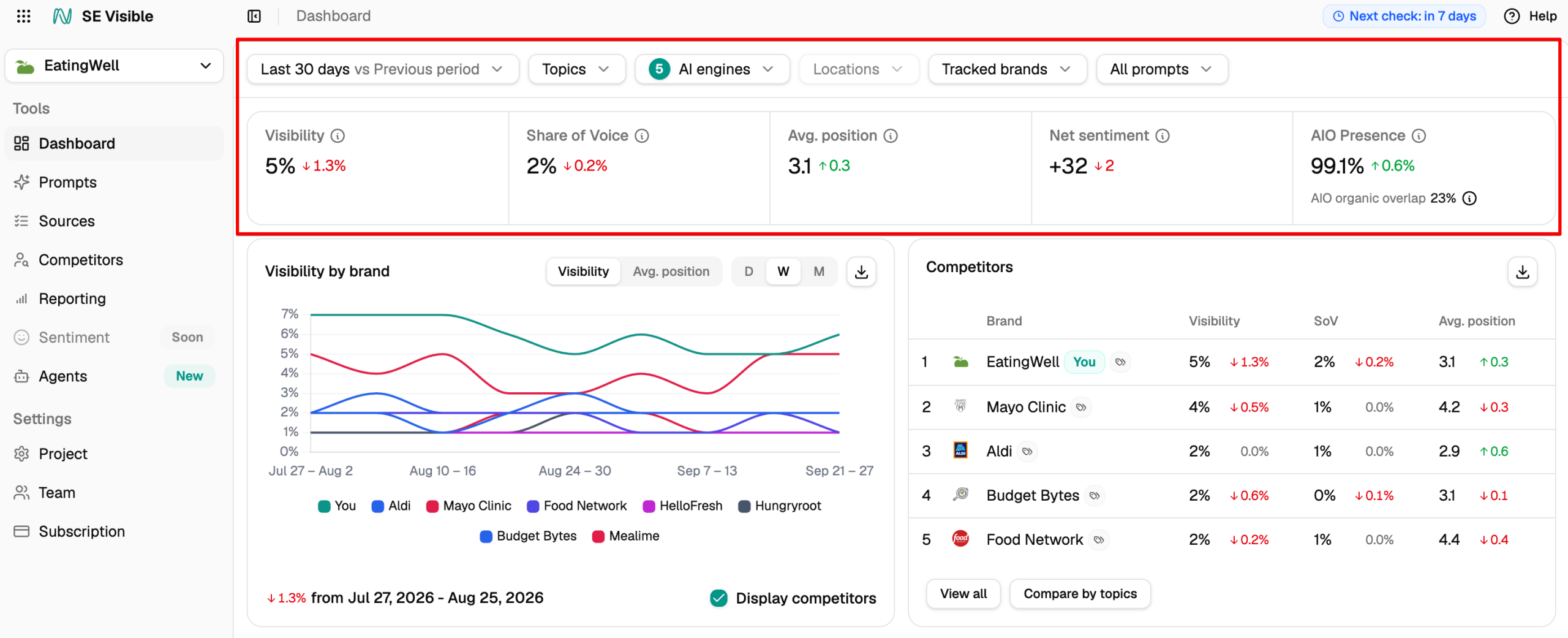
Here you can find the main data for your brand:
- Visibility by brand: Your visibility over time, plotted next to tracked competitors. You can switch the chart to average position and change how the timeline is grouped. You can also hide competitors when a client only wants to see their own line.
- Visibility by search engine: Your metrics for each engine separately. Being strong in one engine and weak in another is normal, and the spread is often wide. This is where you decide whether to defend the engines you lead or invest in the ones you don’t.
- Sentiment: Your net sentiment score with the full split beneath it, plus the number of mentions analyzed.
- Sources and Top prompts: Previews of your most-cited sources and highest-performing prompts, with links into the full views.
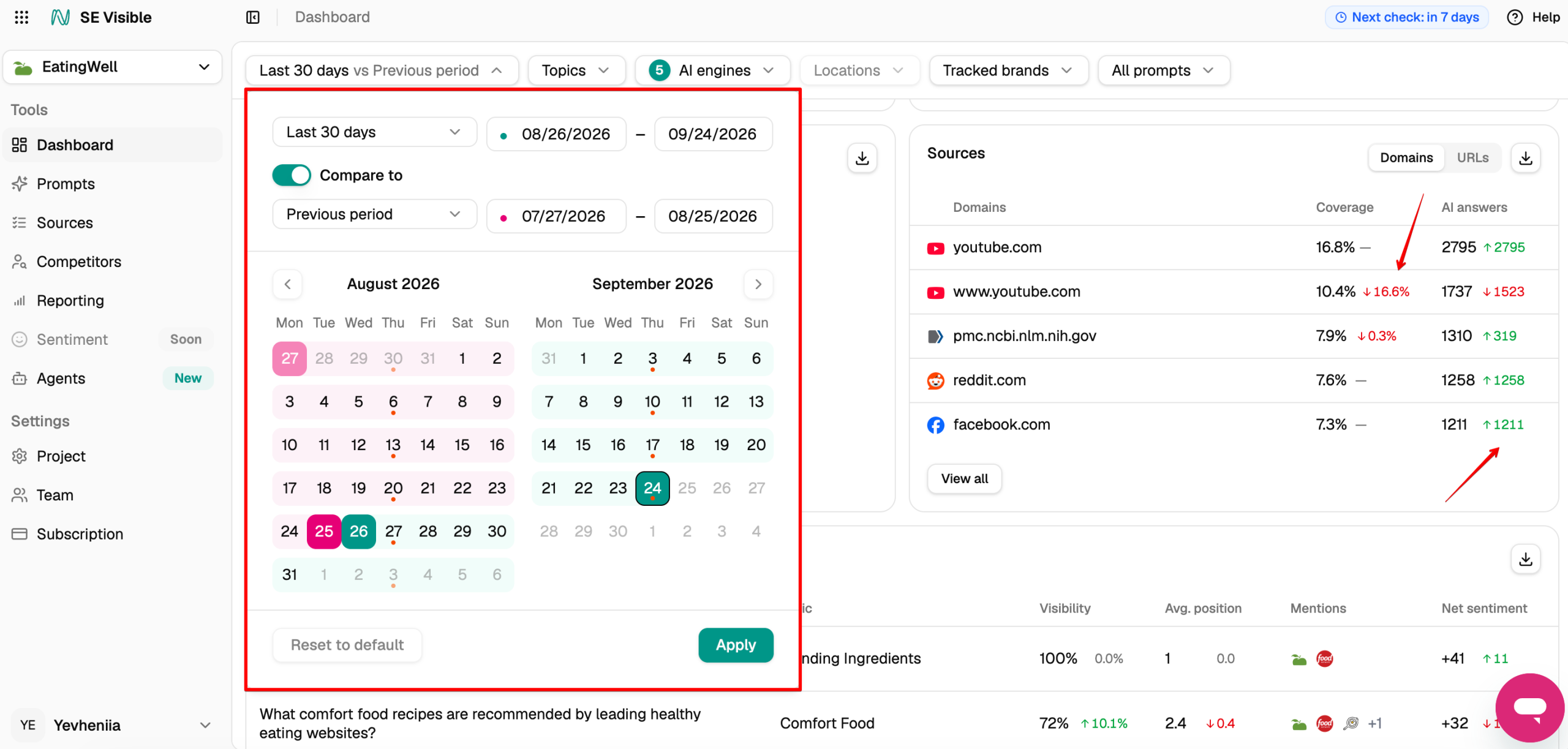
You can filter data by date range (with period comparison), topics, AI engines, location, brands, and branded or non-branded prompts.
The date range is where AI search differs most from classic SEO. A rank check gives you a position you can act on. A single AI answer tells you very little on its own: ask the same question again, and you may get a different set of brands in a different order. The signal is in the aggregate, so look at longer periods, such as 14 to 30 days, and compare them with the period before.
When you compare periods, each metric shows its absolute and percentage change, and you can sort by value or by what moved most. The comparison also carries through to the Competitors and Sources panels.
Prompts: which questions bring you into answers
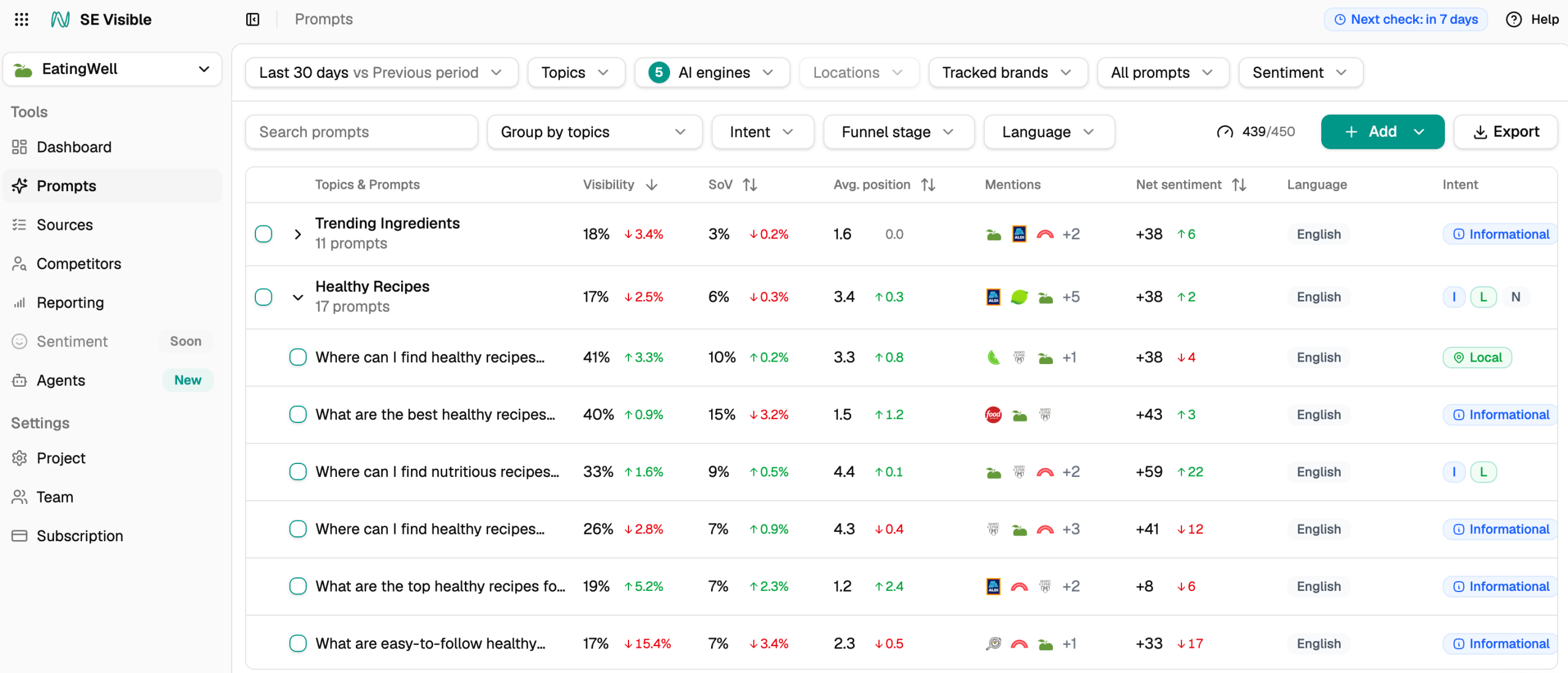
The Prompts view lists all tracked prompts grouped by topic, with a prompt count for each topic, so thin topics stand out at a glance. Each topic and prompt carries its own visibility, share of voice, average position, mentions, and net sentiment. You can filter by engine and see how each topic moved since the last check.
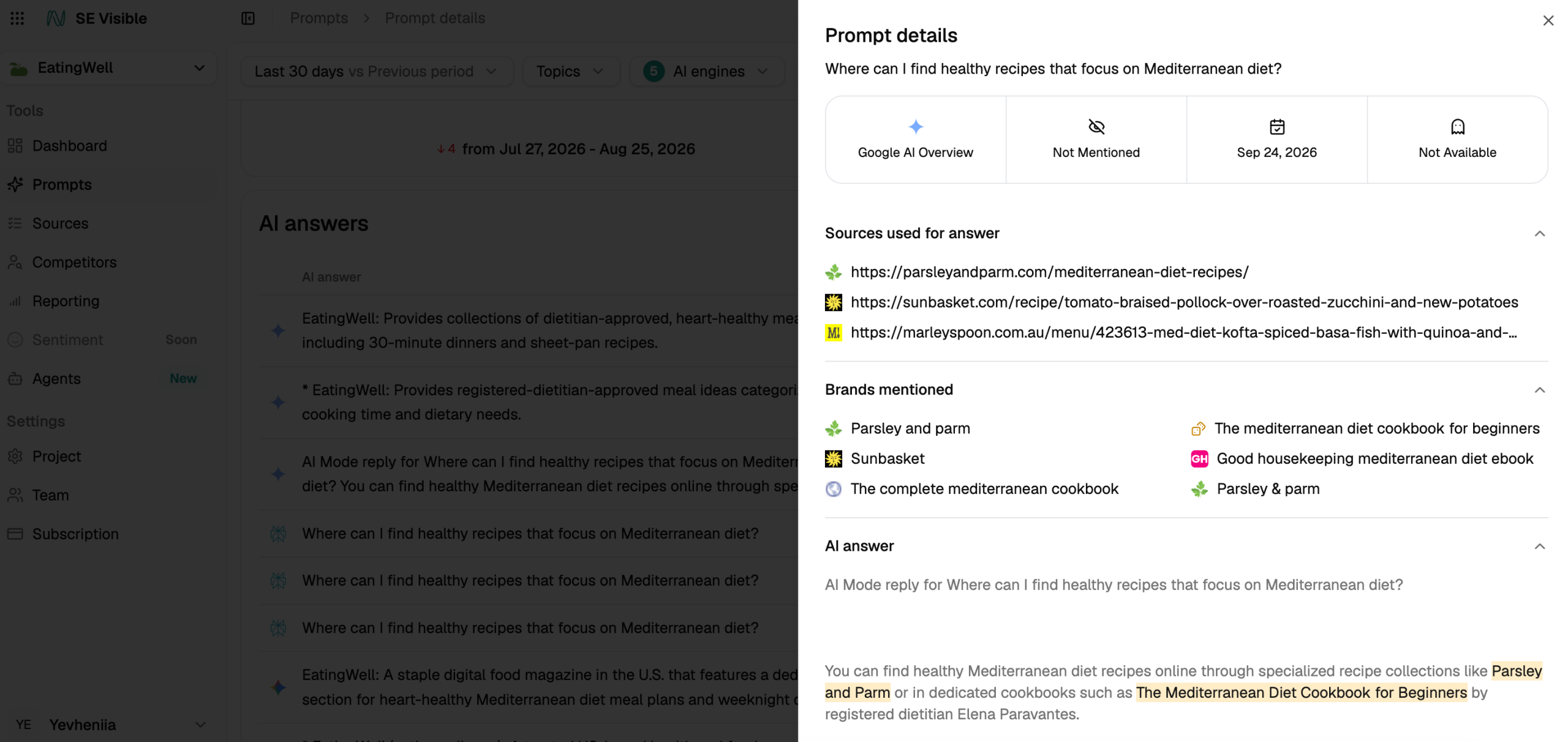
Open a prompt and you get the AI answers collected for it. For each answer, you can read the exact wording and see which sources the engine used. The brands it named are listed alongside.
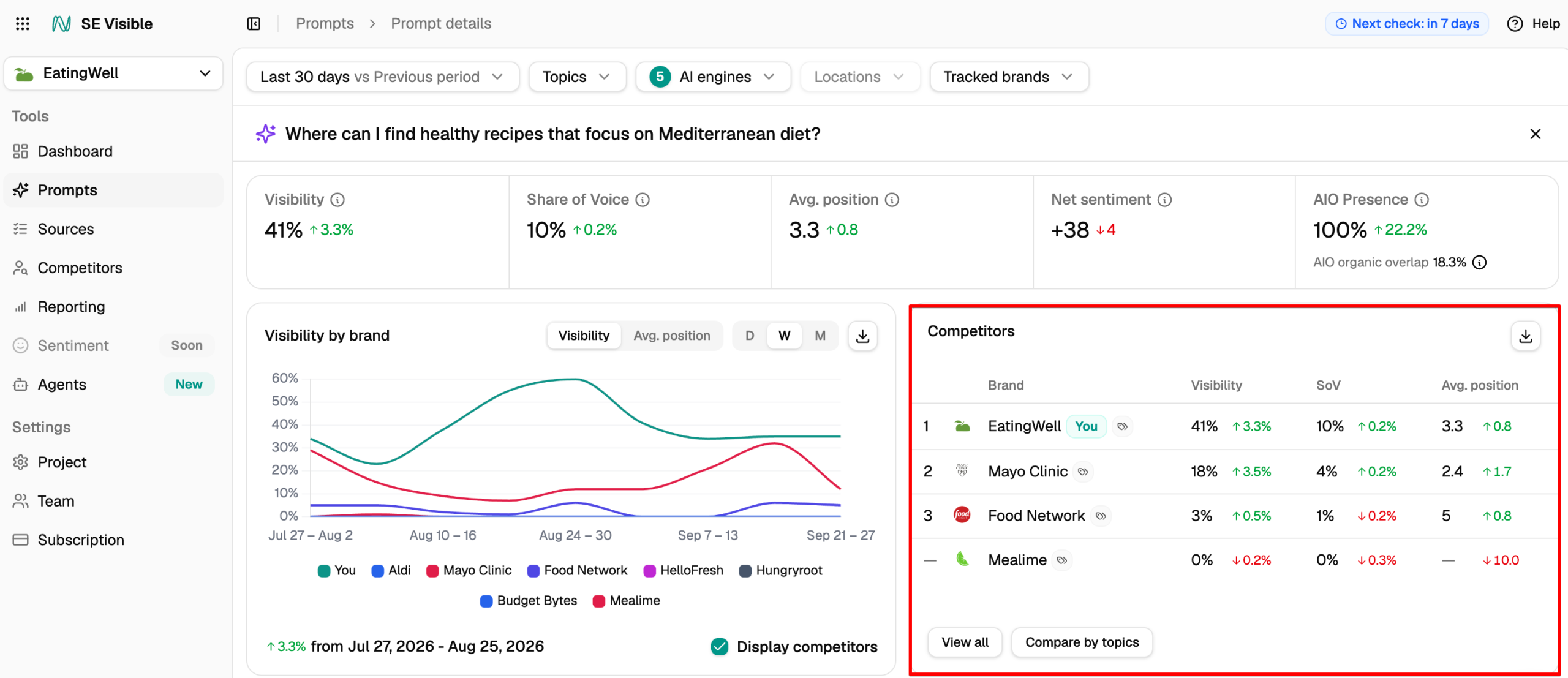
The Prompts view also benchmarks competitors prompt by prompt. For each prompt, you see which competing brands were mentioned, how often, and at what average position.
Each tracked prompt is classified by intent: informational, navigational, commercial, transactional, or local and funnel stage to help you separate questions tied to a buying decision from general curiosity about your category.
It’s also worth tracking both branded and unbranded prompts, because they answer different questions. Unbranded prompts show whether AI surfaces you at all, and who it names instead. Branded prompts show how AI describes you when someone asks about you directly.
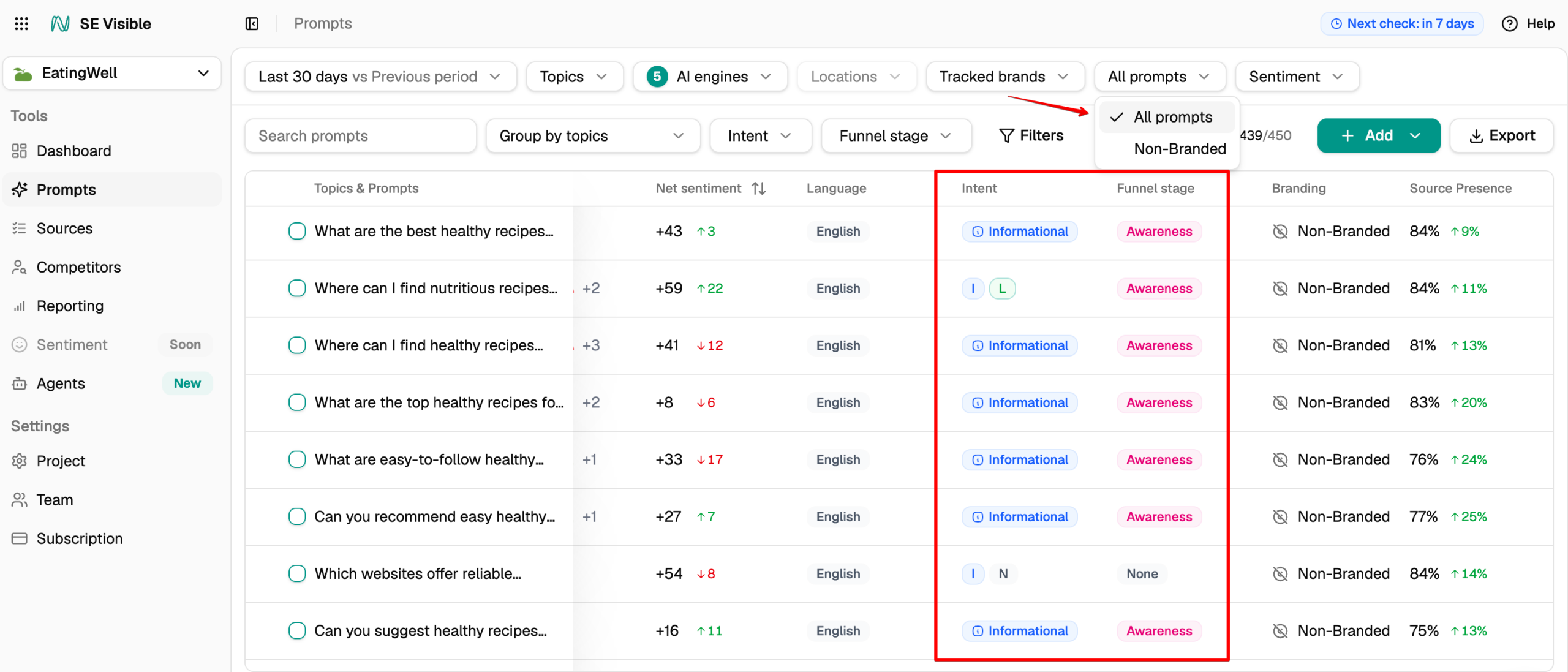
Keep that split in mind when you read your overall numbers. A branded prompt names your brand in the question, so the answer will very likely mention you too, and visibility for those prompts tends to sit close to 100%. Mixed into your totals, they inflate your overall visibility. To see how you perform on open category questions, switch the All prompts filter to Non-Branded. The filter is available on the Dashboard and in the Prompts, Competitors, and Sources views.
Competitors: who AI names beside you
The Competitors view puts your brand and your tracked competitors side by side. You can switch between four views across the top: visibility, share of voice, average position, and net sentiment.
Each prompt shows a column per brand, with a #1 badge on the leader. Trend arrows show who gained or lost ground against the previous period.
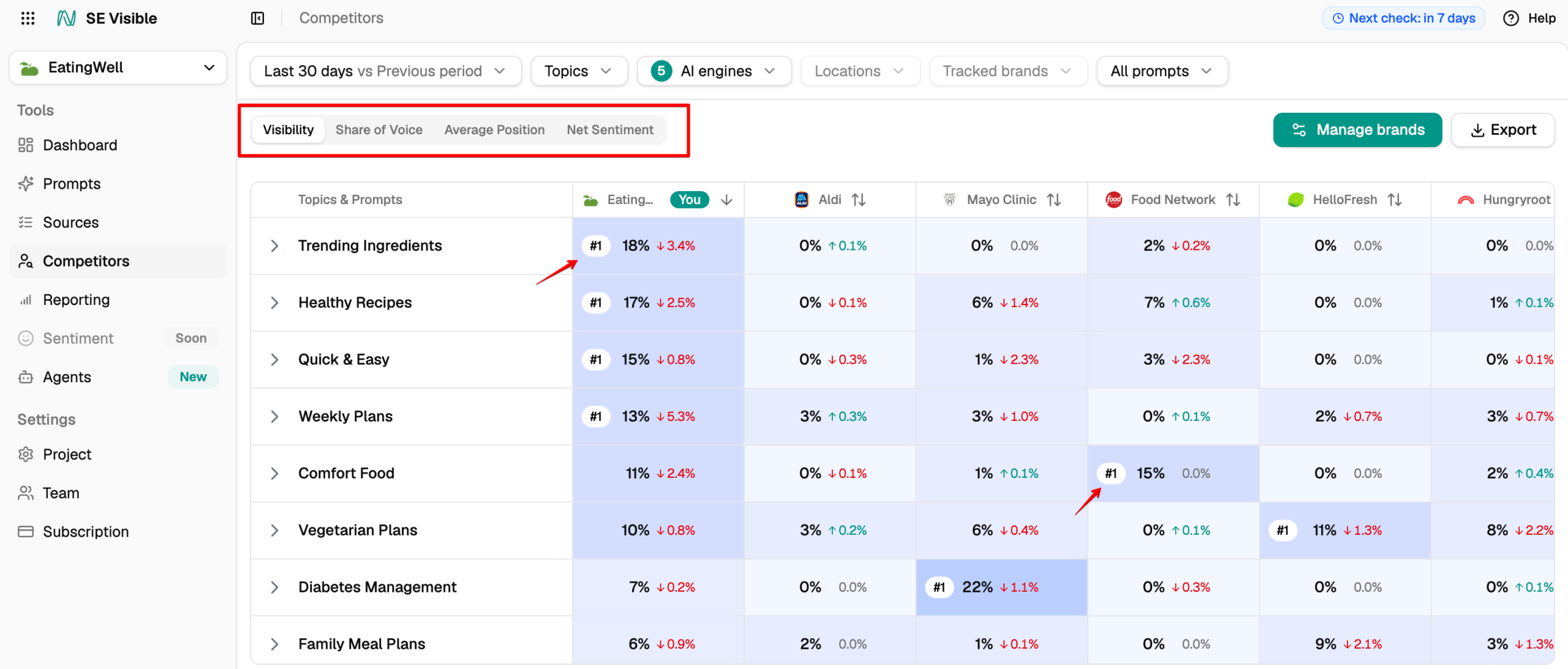
Compare by topics turns this into a grid of your topics against each tracked brand. Gaps are ranked by size, so the topics where competitors outperform you most rise to the top. For each topic and prompt, you can also see which competitor gets mentioned most.
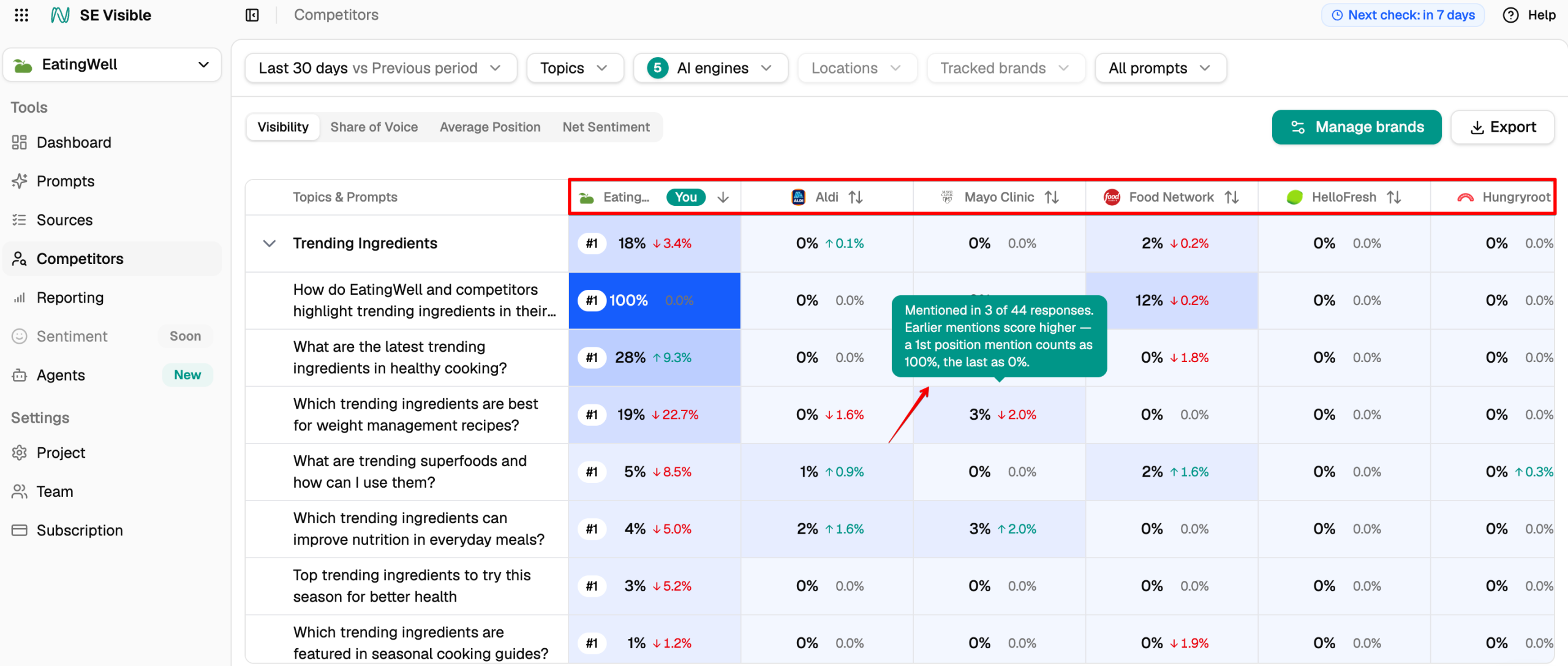
The net sentiment view adds the tone gap: how AI describes you next to how it describes each competitor. Being mentioned less often than a rival is one problem. Being described less favorably is a different one, and it needs a different fix.
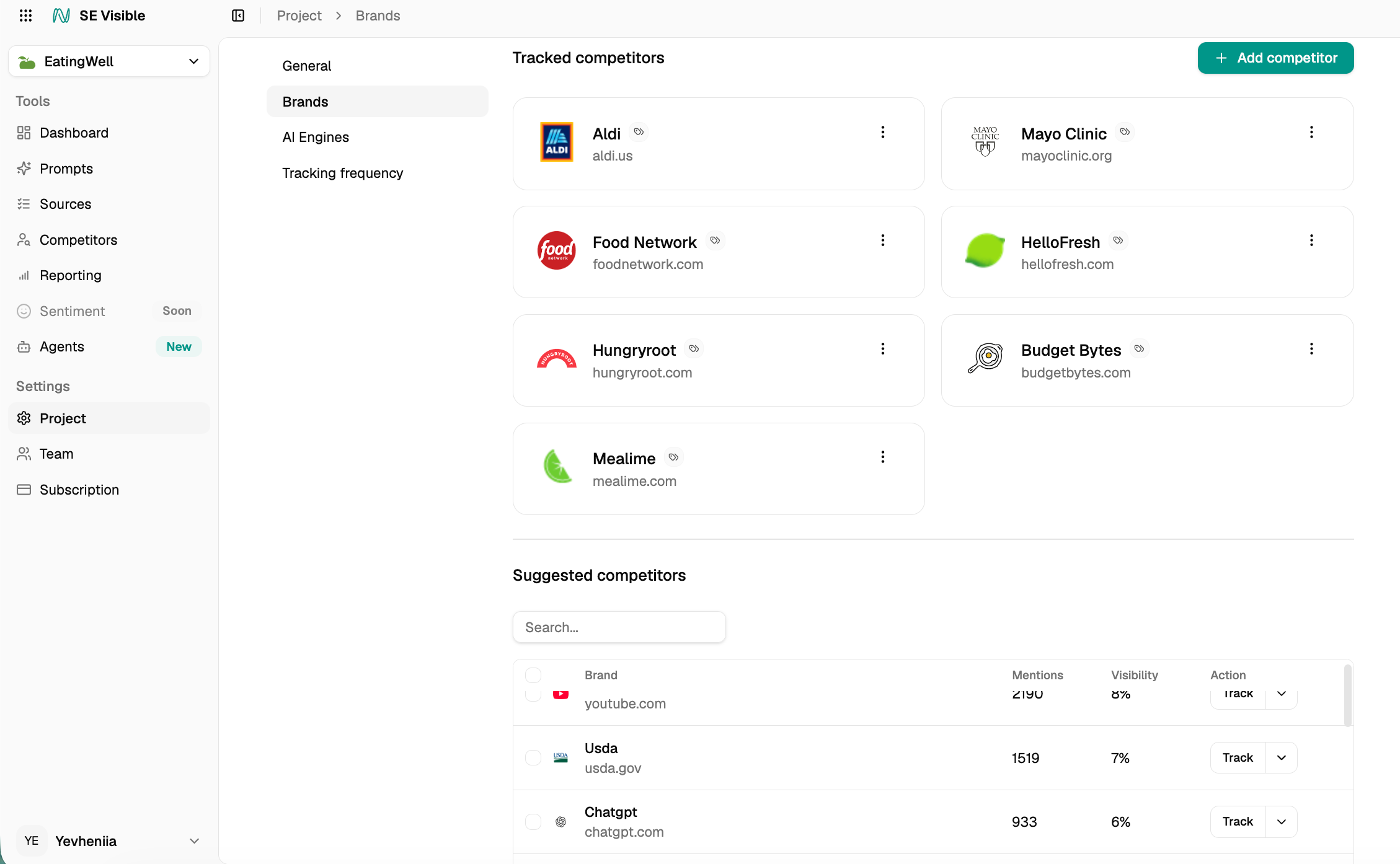
Competitors are suggested from your own mention data, so you start with the brands AI actually names beside you. You can add or remove them in Settings → Project → Brands, where suggested competitors show their mention counts. Tracked competitors appear by default across the Dashboard, Competitors, and Sources. To present your brand on its own, clear Display competitors or use the brand filter.
Sources: what shapes the answers
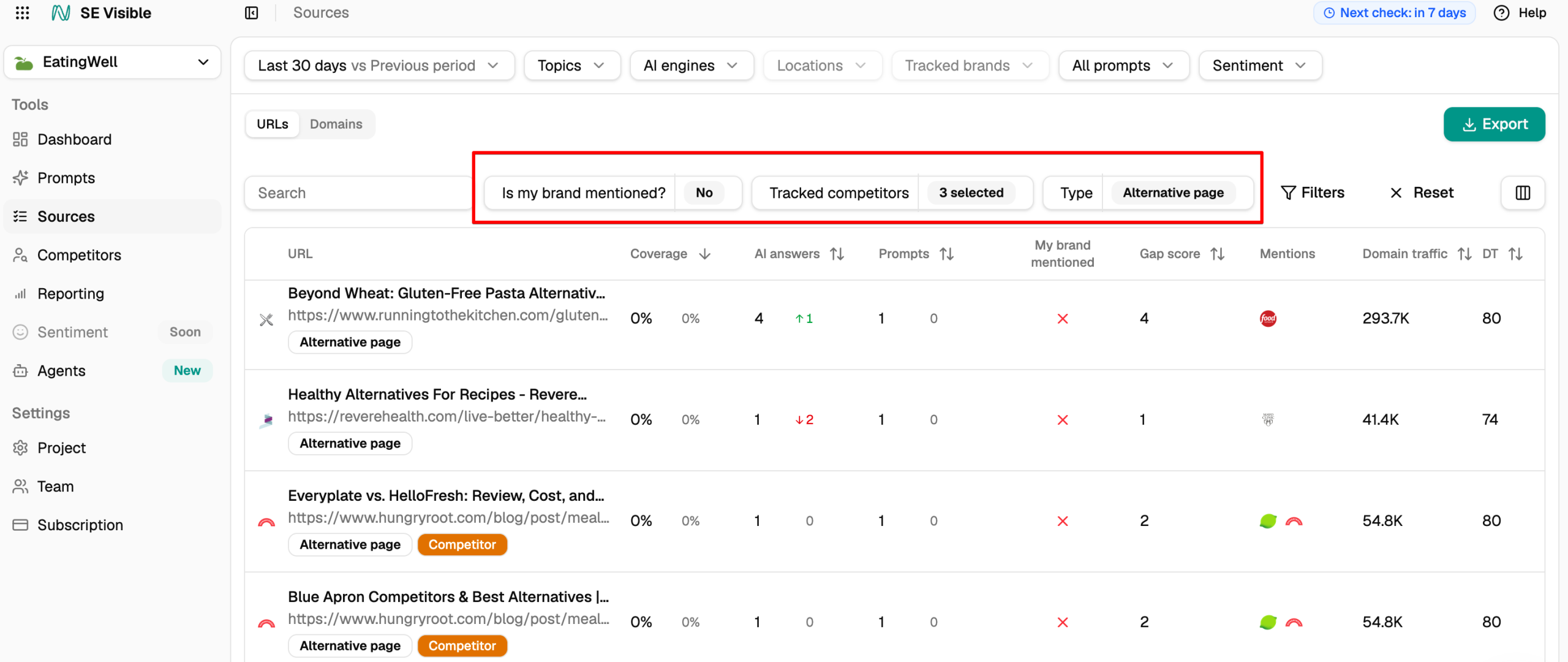
The Sources view shows the domains and URLs AI engines cite for your prompts. Start with your own site: you can see which of your pages are cited, and for which prompts and topics.
You can switch between URLs and Domains. Each row shows:
- The content type of the page, with competitor-owned pages marked
- Coverage, the share of analyzed answers citing it
- How many AI answers and prompts it appears in
- Which of your tracked competitors it mentions
- Its Gap score
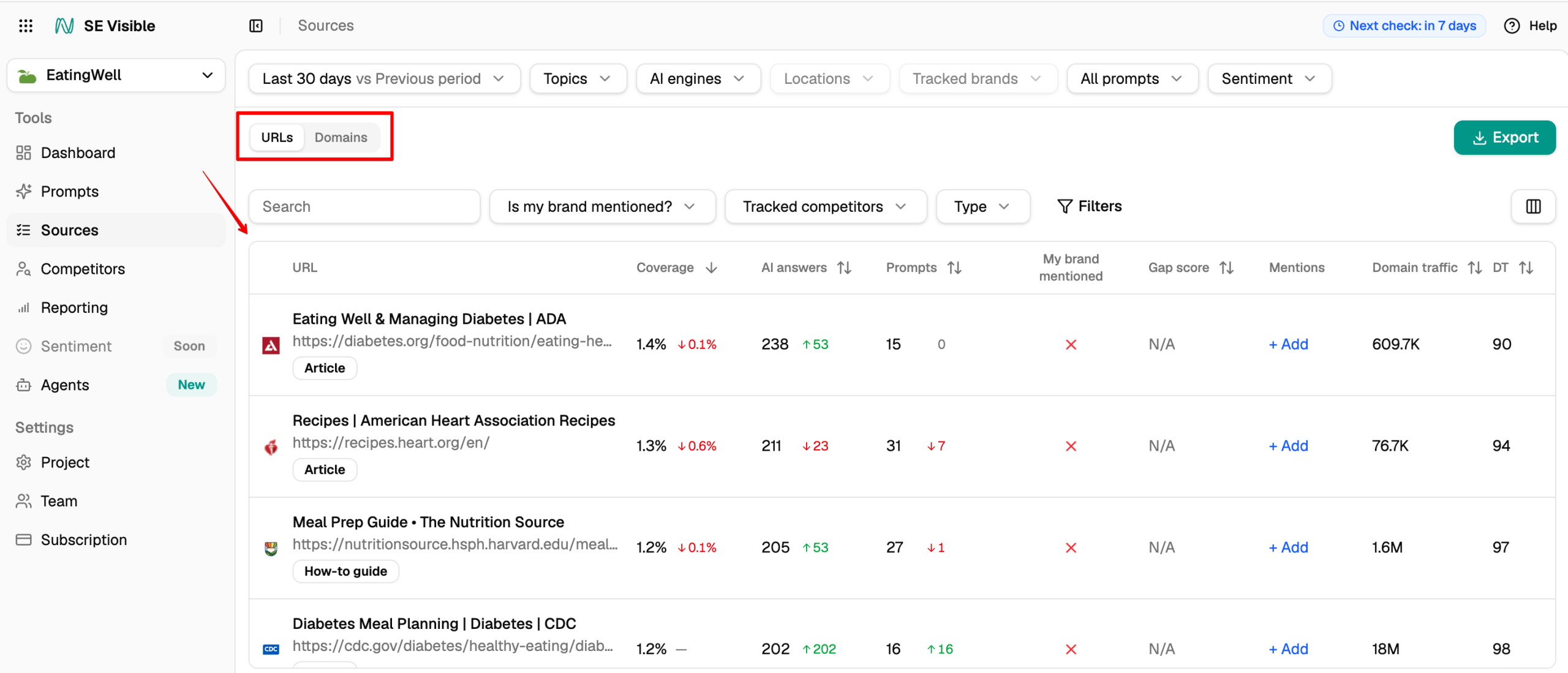
The gap score ranks pages that cite your competitors but not you. Pages that name more of your competitors, and get cited more often, rise to the top. It gives you a ready-made starting point for outreach.
Filters narrow that list further:
- Is my brand mentioned? set to No shows all cited pages where your brand is absent, whether or not a competitor appears there.
- Tracked competitors narrows it to pages that name your rivals.
- Type sorts sources into 24 content types, from video and community threads to product pages and listicles. It shows which formats earn mentions in your market.
For what the citation data says about which tactics actually earn mentions, see our answer engine optimization guide.
Sentiment: how does AI describe your brand?
Sentiment runs through all four views. The dashboard shows the overall balance, and each answer shows the sentiment of the mention inside it.
When something looks off, the workflow is short:
- Spot a negative or inaccurate description in the sentiment data or a prompt’s answers.
- Open the answer and read the exact wording.
- Check which sources the engine cited for it.
- Reach out to the source owner to fix it.
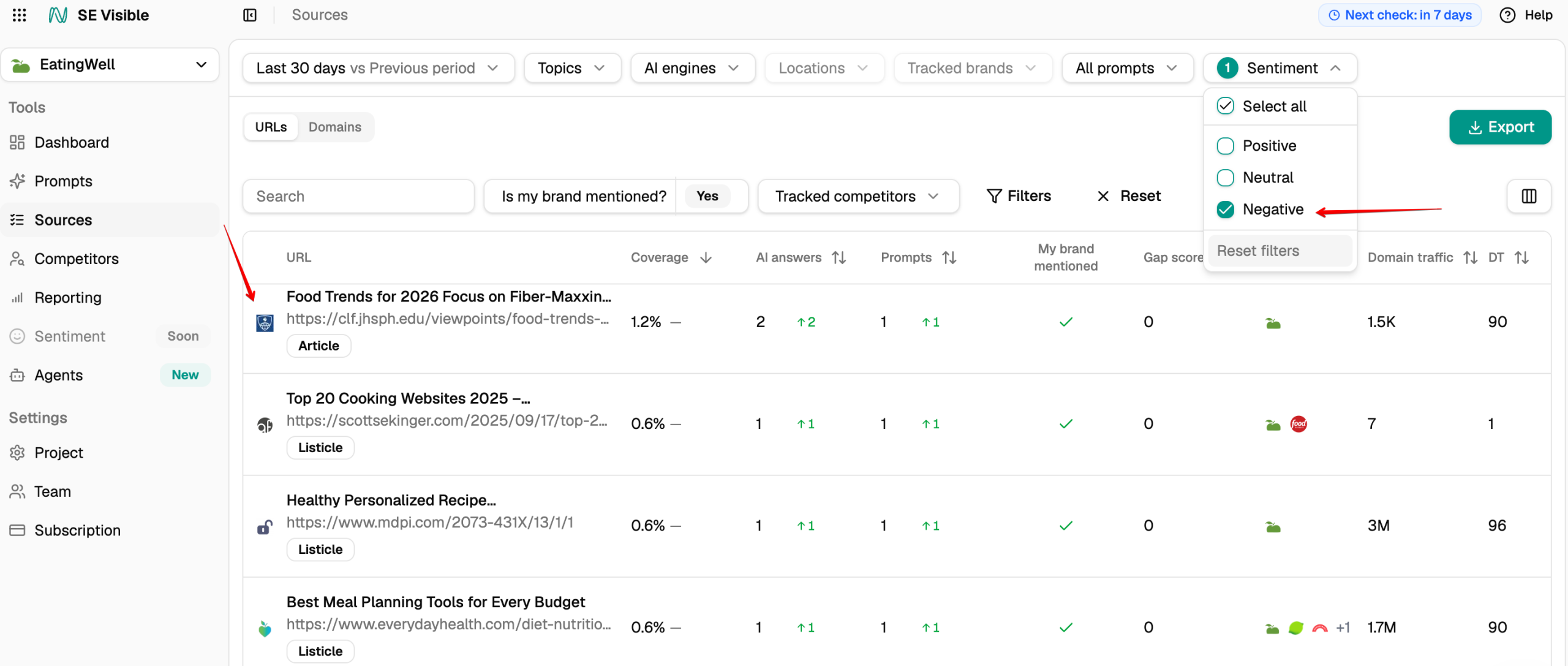
That last step matters because you can’t edit an AI answer directly. What you can change is the source behind it, which is often an outdated third-party page that never got corrected.
Which AI engines and locations does SE Visible track?
SE Visible tracks the same five engines on all plans: ChatGPT, Gemini, AI Mode, AI Overviews, and Perplexity. There are no per-engine add-ons, and you choose which engines to switch on for each project.
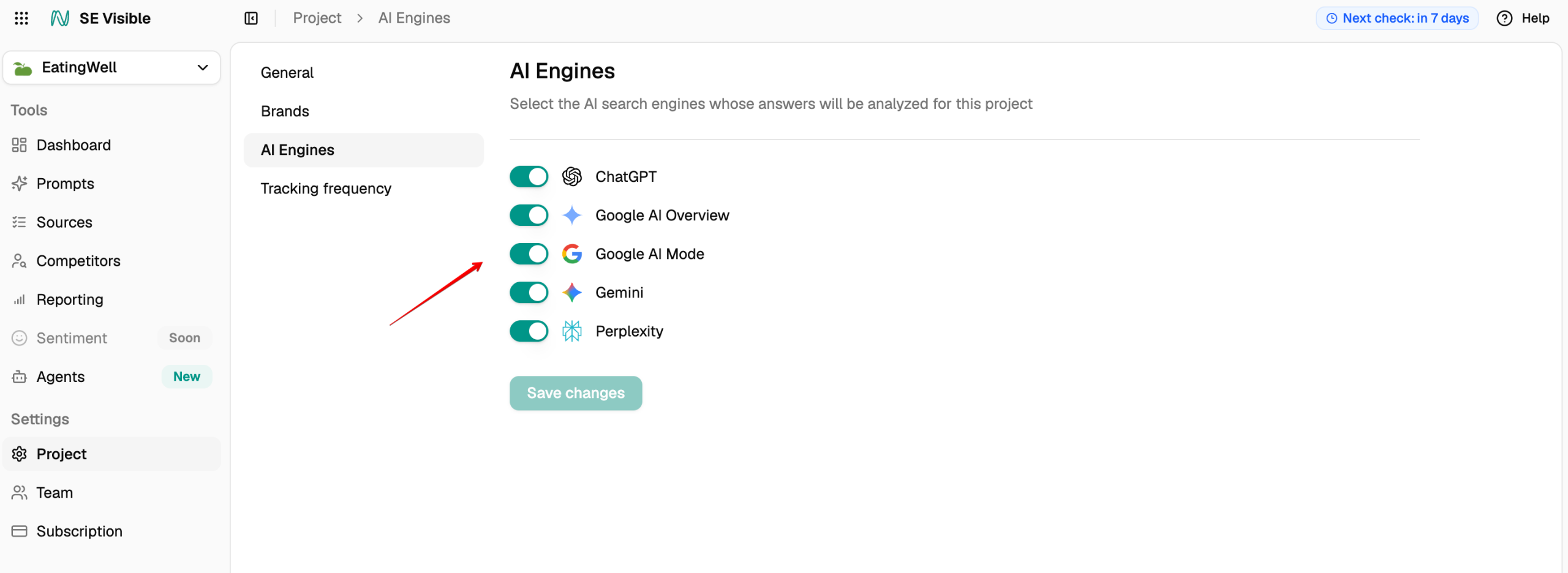
That’s worth checking when you compare platforms, because several AI visibility tools charge extra per engine or reserve broader coverage for higher tiers.
A project tracks one brand in one location. Tracking is available in 42 countries, and you can narrow a project to a specific city or region inside a country. That’s worth doing if you sell locally, because answers to local questions shift with location.
Each project also has its own prompt language. Prompts are generated and checked in that language, the way a user in that country would see them. The language list follows the country you pick, with the most widely used language pre-selected.
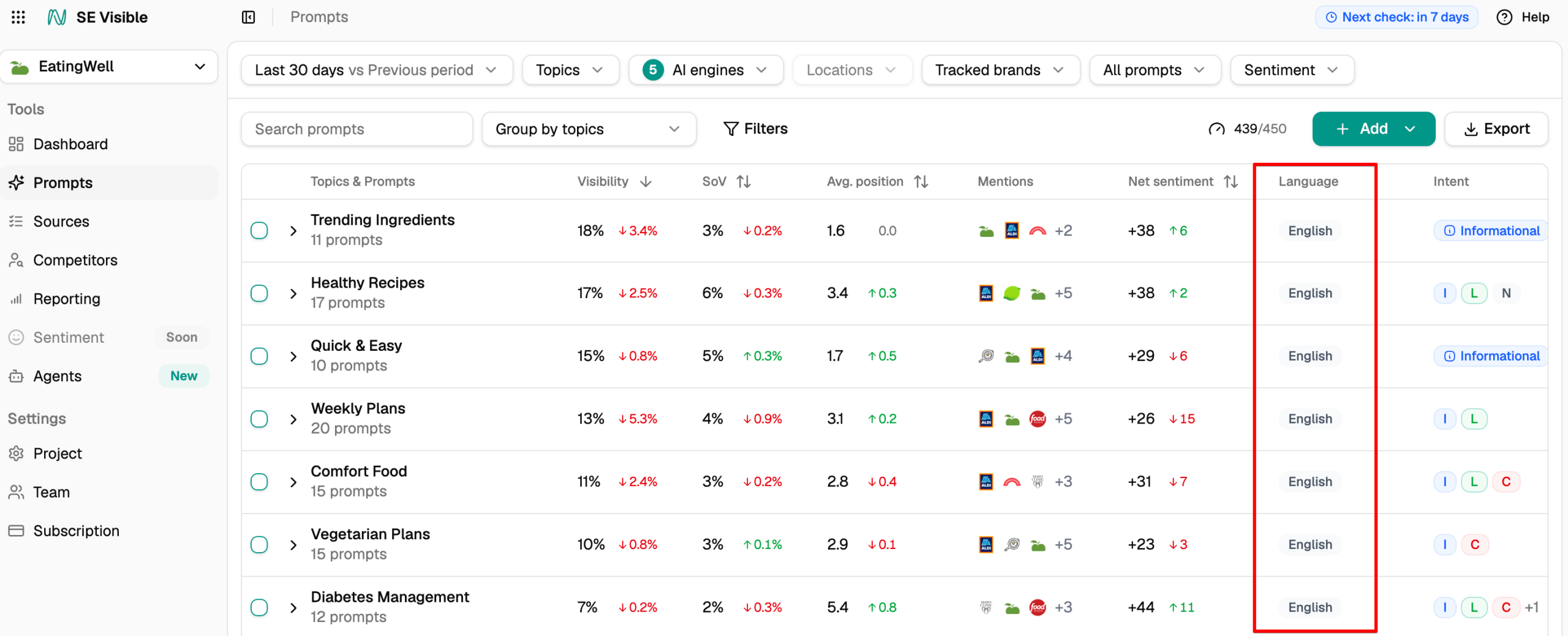
To track the same brand in another country or city, create a separate project for it.
How does SE Visible collect AI answers?
SE Visible collects answers through a real browser session in each engine’s user interface, the same place your buyers see them, instead of through an API. Each response is stored unedited.
This matters because an engine accessed through its API runs on a different configuration from the one your buyers use in the app. The system prompt differs, and so do grounding and retrieval. A score built on API responses measures a product your buyers aren’t using.
That’s how a number can look precise and still disagree with what a client sees when they open ChatGPT themselves. Collecting through the interface closes that gap. It also captures more of what engines cite, and source coverage is significantly more complete than with API-based collection.
Each answer is stored in full, exactly as the engine served it. It’s tagged with the engine and market, plus the date it was collected. For each answer, you can see:
- Whether your brand was mentioned
- Whether your site was cited as a source
- Your position in the answer
- The sentiment of the mention
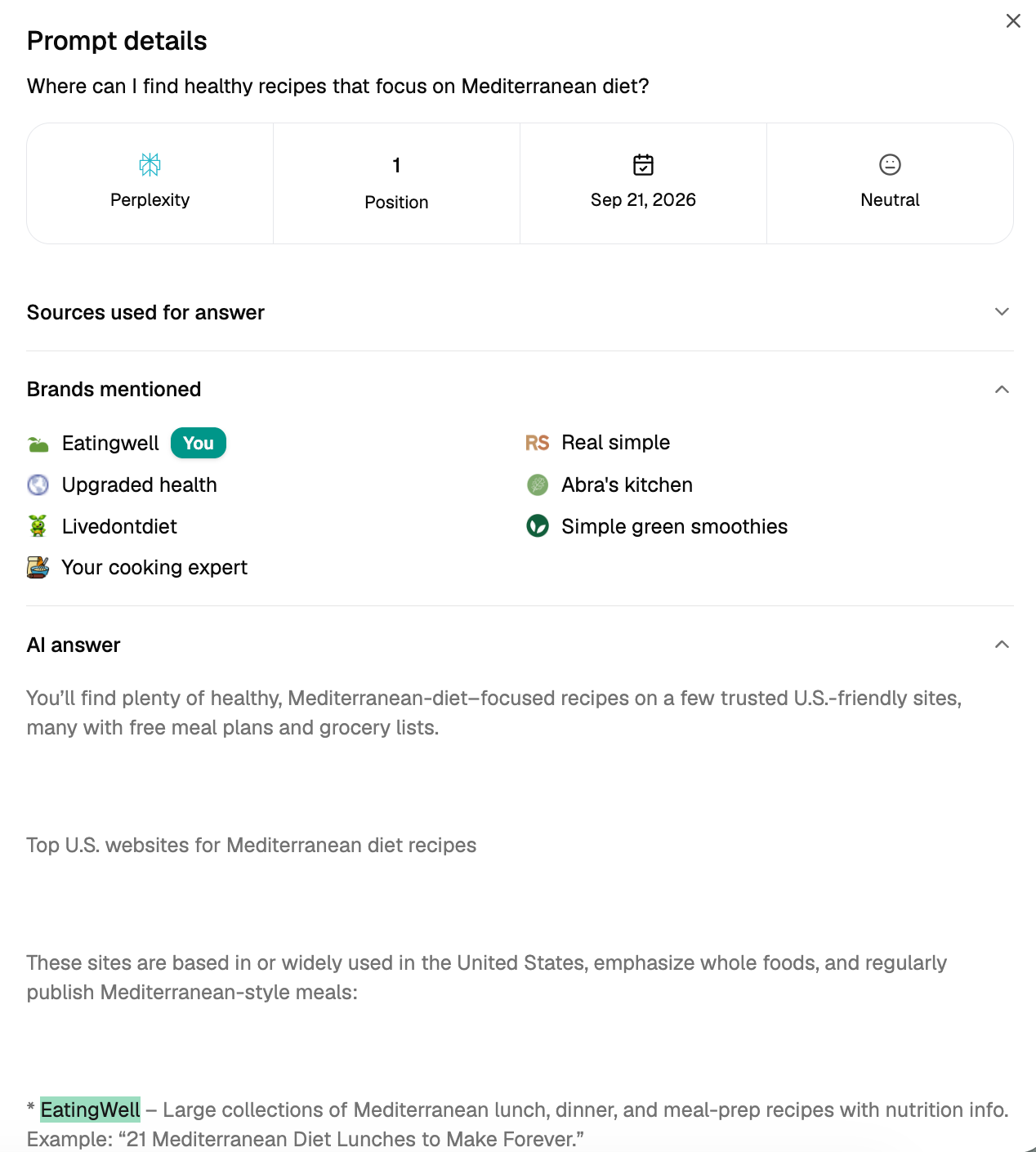
Linked and unlinked mentions are counted separately, so a brand named without a link isn’t blended with one that earned a citation. Because answers are stored, you can also go back and compare how an engine’s wording about your brand has changed over time.
Does SE Visible support brand aliases?
AI engines rarely stick to one version of a brand name. The same answer might use your full name in one sentence and an abbreviation in the next.
SE Visible spots these variants and suggests them as aliases. Once you confirm one in Settings → Project → Brands, mentions under that name count toward your brand in all metrics, including brand mentions on cited sources. For example, if your brand name is EatingWell and an engine writes Eating Well, confirming the latter as an alias means those answers still credit you.
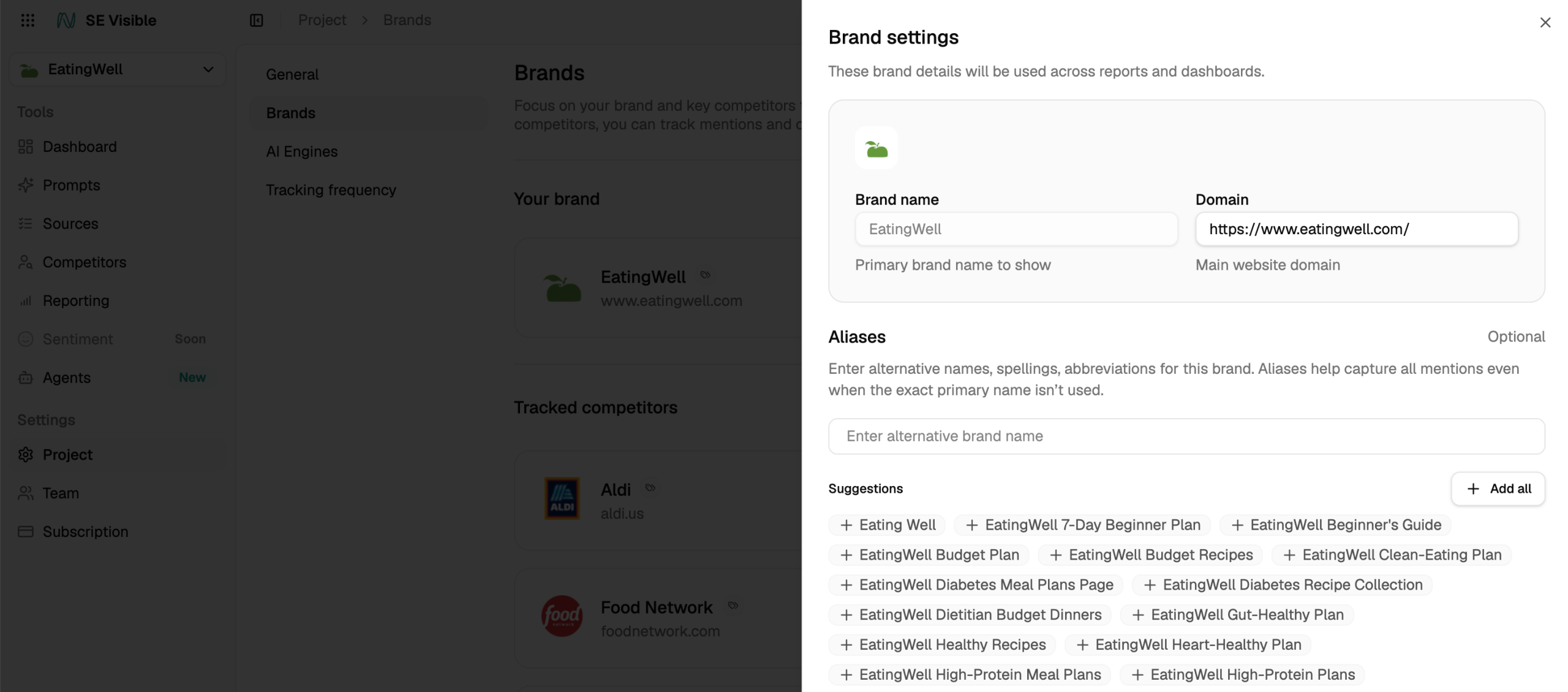
You can set aliases for tracked competitors too, which keeps share of voice accurate on both sides. Rejecting an alias that engines genuinely use works against you: your numbers will understate how visible you really are.
How often is SE Visible data refreshed?
SE Visible checks all tracked prompts in all selected engines daily by default. Depending on your plan, you can switch a project to weekly checks. You can change the frequency in Settings → Project → Tracking frequency, and the dashboard header shows when the next check is due.
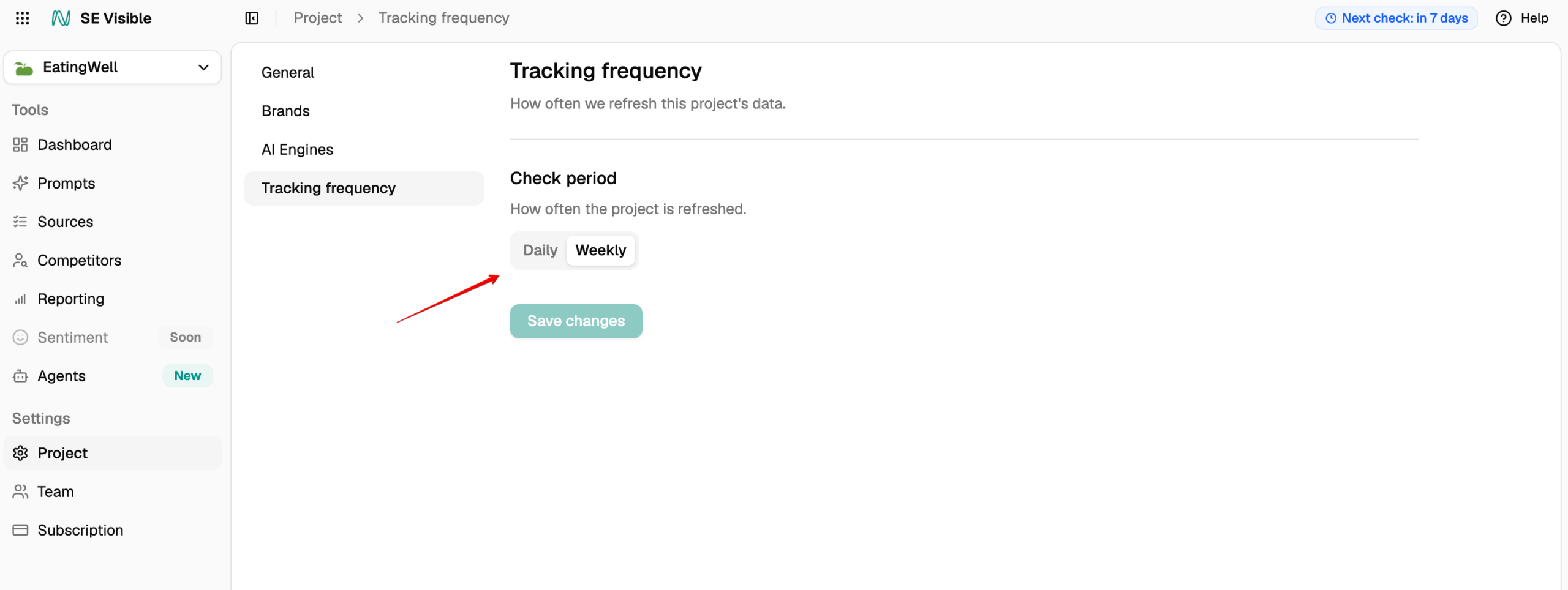
AI answers change from one run to the next, often more than people expect. SE Ranking’s research found that only about a third of cited domains repeat for the same prompt across runs. A single check tells you what one answer looked like at one moment, and very little about where you actually stand.
Daily checks give you more data points in each period, which smooths out that noise. When your visibility moves, you can tell whether it’s a real shift or one unusual answer.
How does prompt tracking work in SE Visible?
When AI search took off, much of the market assumed prompts would work like keywords: track as many as possible and watch the positions. That idea is appealing if you sell tracking volume. It doesn’t match how teams actually use the data.
Prompts behave differently. They have no search volume attached, and the answers shift from one run to the next. Most prompts in a huge set never touch a buying decision, so tracking thousands of them tends to bury the signal under noise you’ll never act on.
SE Visible takes the opposite approach. Prompts are grouped into topics and tagged by intent. The set stays focused, and daily checks smooth out the volatility. That makes it easier to see what’s moving and whether it matters.
During setup, you can pick up to five topics to monitor. Suggestions for your industry arrive pre-selected, and you can add your own. Then set how many prompts SE Visible should discover.
You can then manage, add, or remove your topics and prompts from the Prompts view.
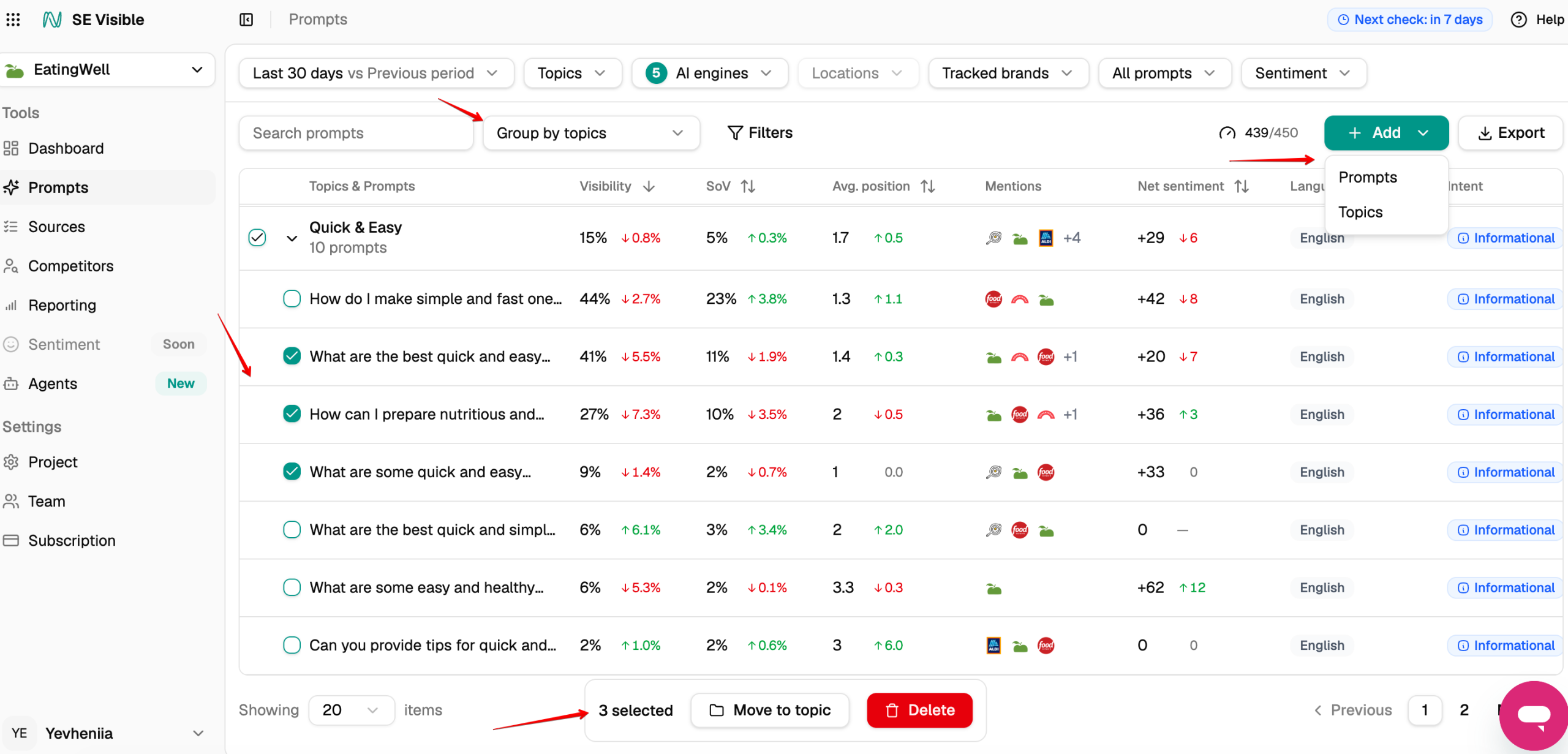
Two details are worth knowing before you plan your projects:
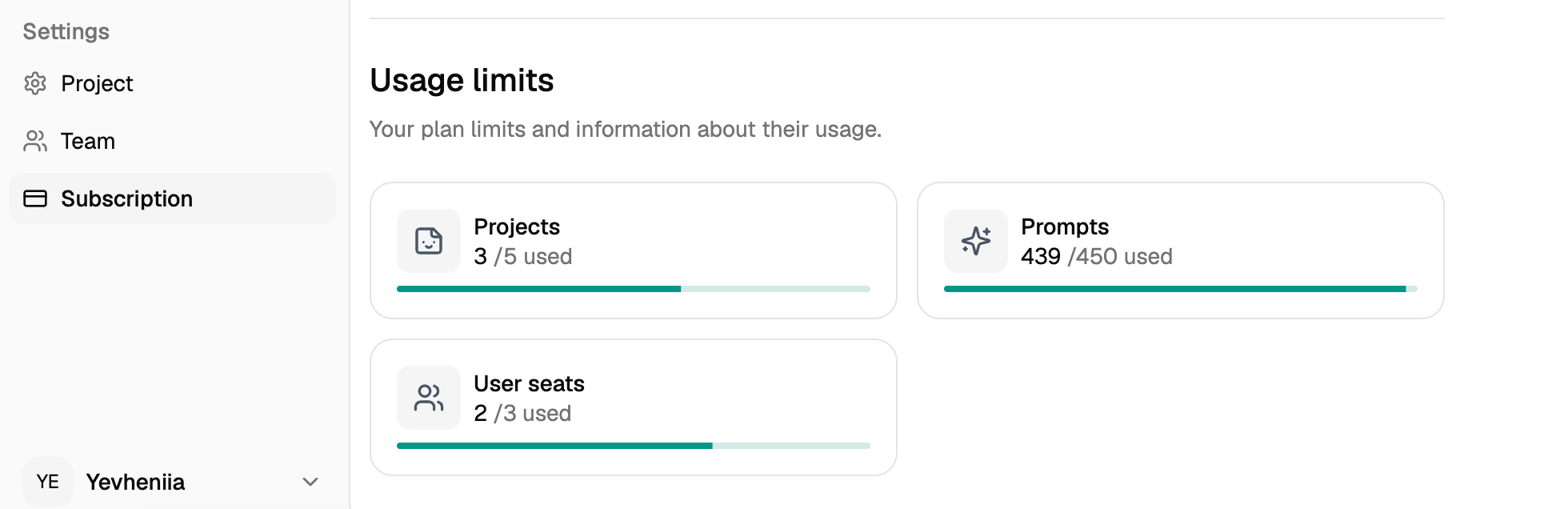
- The allowance is shared. It’s pooled at account level, so one project can use up most of it. Set the prompts-to-discover number deliberately for each project.
- Engines don’t use it up. Each prompt counts once per location and language, so switching engines on or off leaves your usage unchanged.
You can see how much of your plan you’ve used in Settings → Subscription, under Usage limits.
How does SE Visible calculate AI visibility?
SE Visible reports four headline metrics: visibility, share of voice, average position, and net sentiment. Visibility combines how often you’re mentioned with where you appear.
Each time your brand is mentioned in an answer, the mention gets a weight based on its position. The weight adapts to how many brands the answer names:
weight = (total brands – best position + 1) / total brands
The brand named first gets the full weight of 1.0. The brand named last among N brands gets 1/N. If your brand appears several times in the same answer, only its best position counts.
The weights are then averaged across all answers in scope, including the ones where your brand wasn’t mentioned. Those count as zero, so missed answers pull your visibility down.
Here’s how three answers add up:
| Answer | Your position | Weight |
|---|---|---|
| 1 | 3rd of 5 brands | (5 – 3 + 1) / 5 = 0.6 |
| 2 | Not mentioned | 0 |
| 3 | 2nd of 4 brands | (4 – 2 + 1) / 4 = 0.75 |
| Visibility | (0.6 + 0 + 0.75) / 3 × 100 = 45% |
The same calculation runs from a single prompt up to a topic or the whole project.
How does SE Visible support reporting?
SE Visible has several features for now:
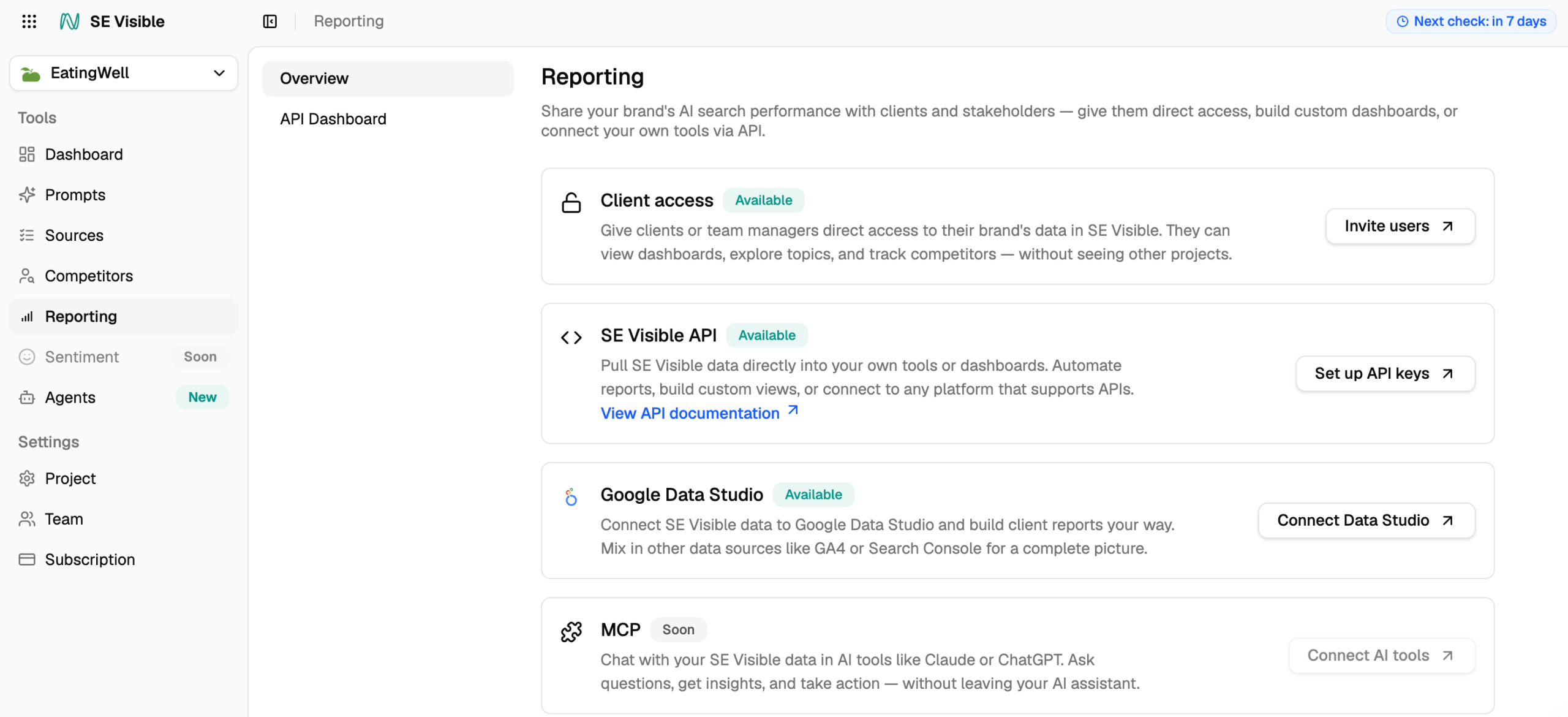
- Individual widgets have a download icon in their header, and exports are in CSV. There’s no PDF export yet.
- You can invite clients or managers straight into their own project with view-only access. They see their brand’s dashboards and competitors, and none of your other projects.
- For recurring client reports, the Google Data Studio connector lets you build dashboards that refresh themselves. You can mix in data from GA4 or Search Console to put AI visibility next to traffic.
- The API is available on all three plans. It covers everything in the interface except managing users and subscriptions.
What are Agents in SE Visible?
Agents are SE Visible’s agentic layer: they monitor how AI answers mention your brand and suggest what to do next. The feature is currently in beta.
The four views show you where you stand. Agents take that data and turn it into a list of opportunities worth acting on. Open Agents from the sidebar and you’ll see them grouped by status, in a list or grid view.
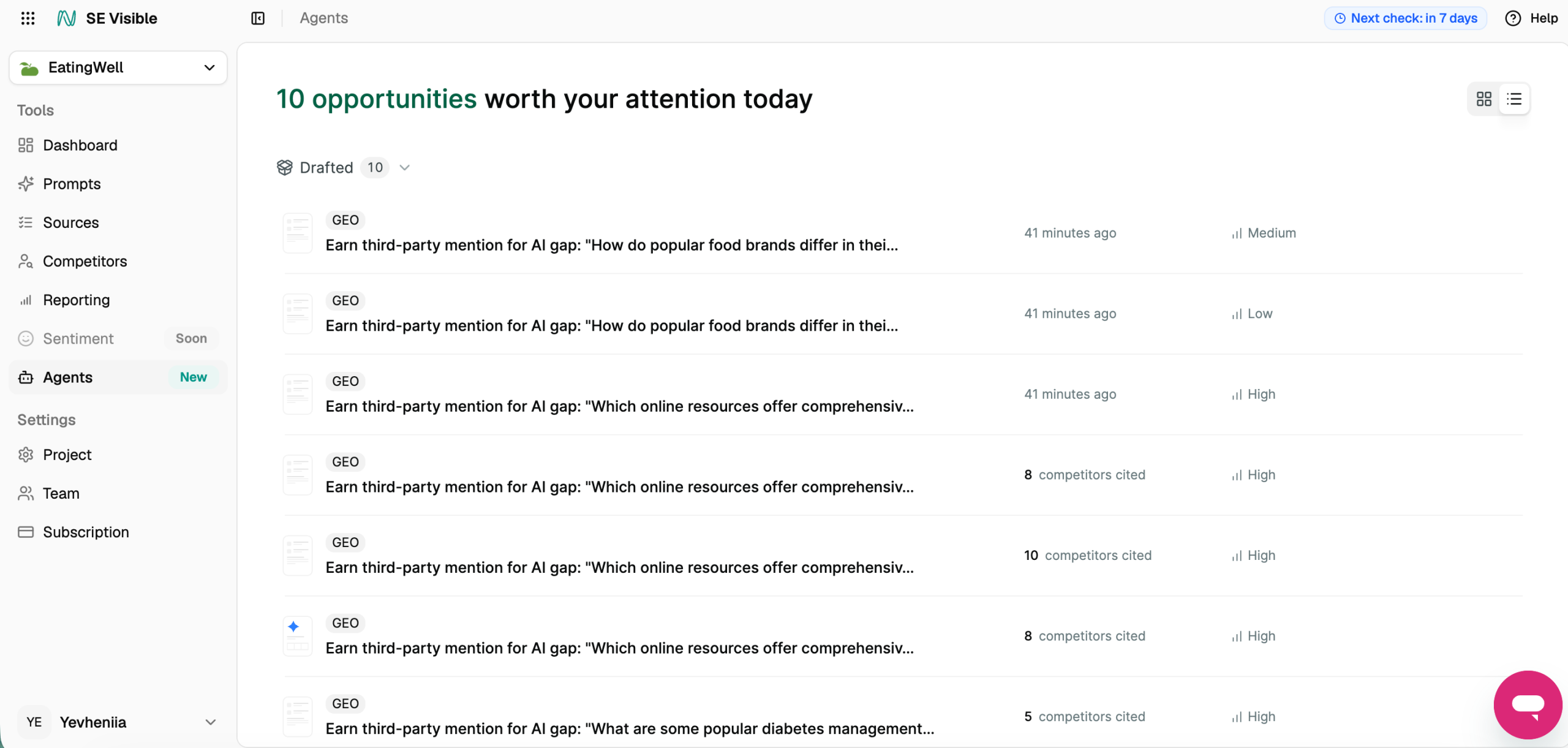
Each opportunity is tied to a specific gap in your AI visibility and shows:
- A type tag, such as GEO
- The suggested action and the prompt it targets, for example, earning a third-party mention for a prompt with a visibility gap
- Supporting context, such as how many competitors are cited for that prompt
- A priority level, from low to high
It’s the same kind of gap you could find by filtering Sources or Competitors yourself. Agents surface it for you and rank it, so you can start with the opportunities that matter most.
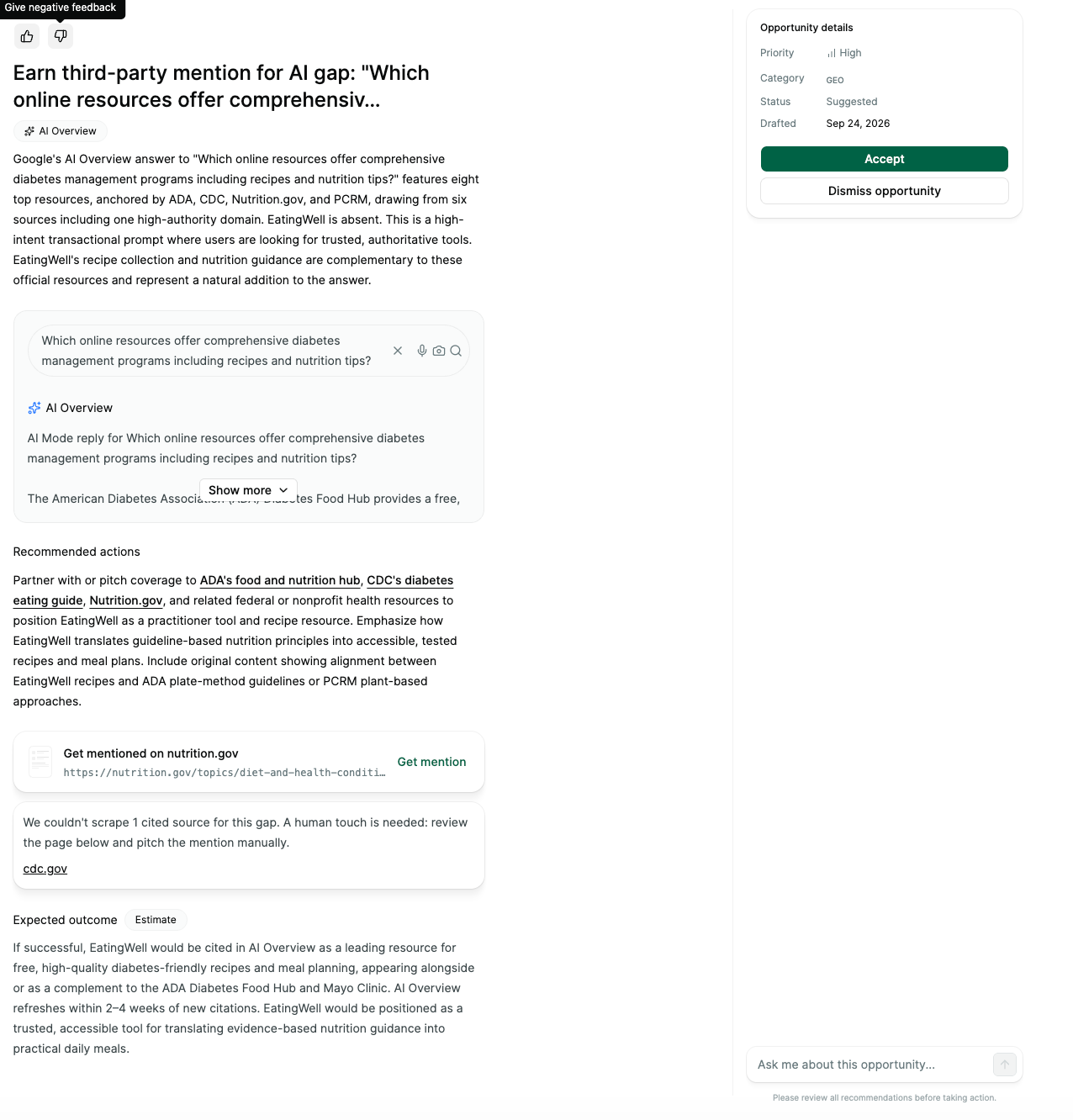
For now, Agents suggest actions, and the decision stays with you. The plan is for agents to run on schedules, such as daily audits and weekly reports, and to respond to events like a drop in mentions or a new citation. The goal is to keep your AI visibility work current without regular manual dashboard checks.
Because Agents are in beta, the feature may change as it develops.
What’s coming next to SE Visible?
SE Visible is still evolving. Here’s a brief look at what’s in development now and what’s planned next:
In development now:
- Brand profiling. A new onboarding flow that sets up each project around what you sell and who you sell to.
- Sources. A new structure, with widgets that show trends by domain type and page type.
- Prompts. Customizable columns, so you can reorder them and choose which ones to show.
Planned next:
- Claude and Copilot. Two more engines alongside the current five.
- More comparison metrics. New ways to compare your brand with competitors, starting with citation share.
- Fan-outs. A view of the sub-queries AI engines run behind a single prompt.
- Source topic clusters and content gaps. Cited sources grouped by topic, with the content gaps they point to.
- Discover. A new section for finding topics and prompts worth tracking.
Each of these updates is shaped by what teams tracking AI visibility have told us they need, and the list will keep growing as the platform does.
How to set up SE Visible for reliable data from day one?
These steps help make your first 30 days of data usable:
- Enter your brand name the way it would appear in an AI answer.
- After the first scan, review suggested aliases for your brand and each competitor in Settings → Project → Brands.
- Keep all five engines on. They don’t use your prompt allowance.
- Set the prompts-to-discover number deliberately for each project, and check Usage limits before adding more.
- Create one project per location.
- Trim the suggested competitor list to the brands you actually benchmark against.
- Use the Non-Branded filter when you read overall visibility, so branded prompts don’t inflate it.
- Choose daily or weekly checks based on how fast your category moves.
- Give it 30 days before drawing conclusions.
- Export anything you need before deleting a project, because deletion removes its entire visibility history.
All project-level settings live in Settings → Project, split into General, Brands, AI Engines, and Tracking frequency.
What happens after you set up a project?
The first scan starts as soon as you finish setup, and results usually begin arriving within about a minute. Change indicators take a few days to appear, because SE Visible compares against data it has already collected. Over time, your history builds up to a 12-month view, and month-over-month trends usually become readable after about three months.
A weekly email also flags changes in your projects, so you know something moved without opening the dashboard.
FAQ
How does SE Visible collect AI answers?
SE Visible collects real AI responses through a browser, using each engine’s graphical interface. It doesn’t rely on simulated answers or API results, so the data reflects what users actually see.
How often are results refreshed?
Daily by default, across all tracked prompts and AI engines. Depending on your plan, you can switch a project to weekly checks.
Can I add my own prompts?
Yes. You can add your own prompts and organize them into topics based on what you want to track.
Does the visibility score include citations?
No. The visibility score is based on brand mentions and their position. Citations of your website are tracked separately in Sources.
Does SE Visible show which of my own pages AI cites?
Yes. The Sources view shows which of your pages AI engines cite, and for which prompts and topics.
Which regions are supported?
Tracking is available in 42 countries, and within a country you can narrow tracking to a city or region. See the full list of supported countries.
Can I track one brand in several countries or cities?
Yes. Each project tracks one location, so create a separate project for each country or city. What you can set up depends on your plan, so check that yours supports the locations you need and has enough projects left.
What can I do with the SE Visible API?
Everything available in the interface except managing users and subscriptions. That includes managing projects and prompts and pulling metrics like visibility score and share of voice. The API is available on all three plans.
What happens to my data if I delete a project?
Deleting a project removes its entire visibility history, so export anything you need first.
Which interface languages are available?
SE Visible is available in English, German, French, Spanish, Dutch, Portuguese, Italian, Japanese, and Russian. System emails arrive in your interface language.
How does SE Visible compare with other AI visibility platforms?
It depends on what you’re moving from. Our reviews of Profound, Peec AI, and Otterly AI break down engine coverage and pricing for each.
See how it works for your brand
A visibility number only helps if you can stand behind it when someone questions it. That’s the idea behind how SE Visible works. Answers are collected in the same interfaces your buyers use and checked daily. Each one is kept unedited, so you can trace any metric back to the response behind it.
The most direct way to see this for your own brand is to run it yourself. Start a 10-day free trial and set up your first project. Within a few minutes, you’ll see where your brand stands across five AI engines.